
Readme files | Data Dictionaries | Codebooks | More about Metadata
Documenting your data and the processes and tools related to your data will help you keep track of what you’ve done with throughout a research project. This documentation, or metadata, provides context, methods, tools, and requirements information for collaborators, and when you share and publish your data.
This documentation (or metadata) may take various forms:
- Persistent identifiers (PIDs), also known as Globally Unique Identifiers (GUIDs), or Persistent Digital Identifiers (PDIs) — are unique identifiers and their reference standard, that are assigned to digital resources. For instance, your ORCID is a PID, the DOI for an article or a dataset is a PID, and research organization registry identifiers (ROR IDs) are PIDs.
- Read more about the power of persistent identifiers in data sharing.
- readme.txt files and other descriptive and methodology information written in narrative/text form
- Data dictionaries and codebooks
- Lab notebooks
Readme Files
A readme file is an important addition to your raw data collection.
Creating and updating them during active research can help you track your work, and makes it that much easier when you are ready to share or publish your data.
Readme files allow others to understand and reuse your data after you have submitted it to repositories by explaining the nuances of your unique data collection.
See the “PCBsSchoolAirREADME v3″ file in this record for an example of a readme file.
Guidelines
- Start during the research project
Documentation will help you and others interpret and understand your data later.- Kristin Briney’s blog post on readme files during research
- “If you didn’t document it, it didn’t happen. In two years you’ll wish you had written more down.” (Mike Harms Lab wiki )
- Use an outline
- For data deposits in repositories, we recommend using this outline by Cornell University’s Research Data Management Service Group
- Update the readme as the project progresses
- Deposit your readme file with your data
Once you have finished preparing your dataset and readme files, you can submit them to your chosen repository. Including a readme file with your data ensures that others will be able to understand and reuse your data (with respect to licenses/permissions) for years to come.
Watch the following video for an introduction to data readme files.
Data Dictionaries
A data dictionary is a file that describes each element of your dataset. If your dataset includes tabular (spreadsheet) data, the data dictionary would include a list of the fields in the table and what they mean, including units and precision.
If your data included R or Python code or scripts, the dictionary would provide a brief overview of the purpose of the code (if not already contained in comments); and information about the code relates to the dataset. [From Smithsonian Data Management Best Practices. Describing Your Data: Data Dictionaries (pdf)].
Data dictionaries have several benefits:
- Keeping things consistent across a project. The dictionary can define data names, labels, units, constraints such as acceptable range of values, and other characteristics.
- Enabling software to process a data file, by providing details to the software about the file. This information might include the type of data in each column (integer, character, date, etc); the name of the column; the physical units, if relevant; whether nulls are included; etc.
- Increasing interoperability and reuse of the data that you want to share and publish.
- Providing “human-readable” details to support discovery, interpretation and analysis.
This image shows an example of a data dictionary:
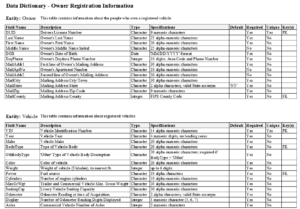
“Owner Vehicle Data Dictionary” by Kelly Lawless, CC BY-SA 3.0
For more details on what might be in a data dictionary, how to make one, and more examples, see:
- USGS Data Management: Data Dictionaries
- Smithsonian Libraries’ Describing Your Data: Data Dictionaries
- Open Science Framework: How to Make a Data Dictionary
Codebooks
Codebooks are used by survey researchers to provide information about the data from a survey instrument. The codebook documents the layout and structure of the data file, the response codes that are used to record survey responses, and other information.
You may be able to define the structure of your project through a data dictionary that you then import into REDCap. In other cases you may need to augment what the tool generated, or create one from scratch.
A codebook enables the user to quickly ascertain some of the details about a dataset before downloading the file. Like data dictionaries, codebooks can provide the information that facilitates the integration of datasets from different sources.
Examples:
- Data Documentation Initiative (DDI) list of examples of marked up codebooks ,
- Encyclopedia of Survey Research Methods
- ICPSR Guide to Codebooks (pdf)
More about metadata
Types of metadata
There are three general categories of this information:
Administrative: licensing information; who can use the data and under what conditions.
Technical: the technical considerations and requirements for working with the data.
Descriptive: the who, what, when, where, why and how of your data; descriptions of the contents of the data/data collection; the subject of the data.
Repositories Use Metadata
Data repositories may use structured information (e.g. your ORCID, or a grant ID, or the date of publication) but they also usually allow depositors to provide other forms of information through readme.txt files, data dictionaries, codebooks, keywords/descriptors, abstracts, and descriptions of methods.
Most data repositories provide information on the metadata standards they use. Some have detailed instructions, and some may even provide data curation support, to augment and refine the information needed by humans (and computers) to find, understand, link to, and use your data.
Properly describing and documenting data allows users (yourself included) to understand and track important details of the work. Standardization enables interoperability between systems, and greatly increases the ability of others to find and understand your data, and know what the requirements are for access re-use. It enables your data to be connected to relevant resources, such as publications, citations, indexes, measures of impact, and grants.
Which metadata should you provide and use?
Some kinds of documentation (metadata) are contained in files that can be deposited along with the data, such as data dictionaries and readme files.
Other kinds of metadata are usually dependent on what the repository will allow. For instance, does it support ORCIDs for authors, and Research Organization Registry IDs (ROR ) for funders and institutions (e.g., NIH , NSF , and UI )? Most data repositories use only one or perhaps a couple of metadata schema(s), depending on the type and subjects of the data they receive.
Check with the repository where you might deposit your data before you begin outlining the metadata information in your data management plan.
Some repositories provide metadata assistance and other data curation support to data depositors, either free or for a fee (e.g., Inter-university Consortium for Political and Social Research – ICPSR ).
If a standard has not been defined for your discipline or you’re not sure what repository you will use, contact us.
For a general data-centric metadata standard, a good starting place is the DataCite schema .
- It has mandatory fields (e.g., creator, title of the dataset), and
- recommended and optional fields that some funders might require (i.e., funding source and grant number), and other elements (e.g., subject, description, geolocation, format, version, rights information).
Tools:
Because creation of standardized metadata can be difficult and time consuming, in some cases tools have been developed to help record metadata (e.g. Morpho allows for easy creation of Ecological Markup Language (EML) for ecological data; Nesstar for metadata for social science data).
If your discipline or repository does not require a specific metadata standard, or you would like assistance, contact us.